
VICIdial AMD Setup Guide: Replacing the Built-In Detector with AI
A step-by-step VICIdial AMD setup guide for replacing res_amd with AI detection. Disable the legacy detector, fork RTP audio over WebSocket, map AMDSTATUS, and set your routing policy — in about 30 minutes.
Marketing Team
VM Hunter
VICIdial is the most widely deployed open-source contact center platform in the world, and its answering machine detection is inherited directly from Asterisk's res_amd module. That module was written in 2006. It has not fundamentally changed since.
If you run VICIdial at any real volume, you have almost certainly noticed the symptom even if you have not measured the cause: agents complain about voicemails reaching them, and prospects occasionally mention being hung up on. Both are the same root problem — a rule-based detector making a binary guess from audio energy patterns it does not understand.
This guide walks through replacing that detector with AI answering machine detection while leaving the rest of your VICIdial installation intact. No fork, no patched dialplan core, no migration off the platform. The integration is additive: you bypass res_amd, mirror call audio to an external classifier, and write the result back into the same AMDSTATUS channel variable your existing dialplan already reads.
Typical time to a working shadow-mode deployment is about 30 minutes. Time to full production cutover depends entirely on how carefully you want to validate — and this guide argues for validating carefully.
What You Are Actually Replacing
Before changing anything, it is worth understanding precisely what res_amd does, because the replacement has to be a drop-in for its outputs even though its method is completely different.
The Asterisk AMD application works by measuring the duration of speech and silence intervals in the first several seconds of a connected call. It has a handful of tunable parameters, and if you have ever opened amd.conf you have seen them:
| Parameter | Default | What it measures |
|---|---|---|
initial_silence | 2500 ms | Silence before any speech begins |
greeting | 1500 ms | Maximum length of a "human" greeting |
after_greeting_silence | 800 ms | Pause after the greeting ends |
total_analysis_time | 5000 ms | Hard ceiling on the decision |
min_word_length | 100 ms | Threshold for counting a word |
between_words_silence | 50 ms | Gap that separates words |
maximum_number_of_words | 3 | Word count above which it guesses machine |
silence_threshold | 256 | Energy level treated as silence |
Read that table again and notice what is missing: there is nothing about content. The detector never knows whether the audio said "hello?" or "you have reached the voicemail of." It only knows that some sound occurred for roughly this long, then stopped for roughly that long.
The core heuristic is essentially: a human says something short and then waits; a machine says something long and then beeps. That is a reasonable approximation of 1990s telephony behavior. It fails badly on modern traffic for reasons that compound:
- Talkative humans. "Hello, this is Dana speaking, how can I help you?" exceeds
maximum_number_of_wordsand trips the machine classification. - Terse voicemail. "Leave a message." is three words and reads as human.
- Mobile network artifacts. Codec transitions, comfort noise, and variable jitter distort the silence measurements the entire model depends on.
- Carrier screening products. Call-screening announcements sound structurally nothing like either category.
- Bilingual and non-English greetings. Word-count heuristics tuned on English cadence generalize poorly.
The published false positive rate for this approach sits in the 15–20% range — meaning roughly one in six live humans gets hung up on. That is the number you are trying to fix.
Critically, though, res_amd's interface is simple and well-defined. It sets two channel variables:
AMDSTATUS— one ofMACHINE,HUMAN,NOTSURE, orHANGUPAMDCAUSE— a short string explaining which threshold fired
Your VICIdial dialplan already branches on AMDSTATUS. That is the seam we are going to exploit. Replace the thing that sets those variables and everything downstream keeps working unchanged.
Architecture of the Replacement
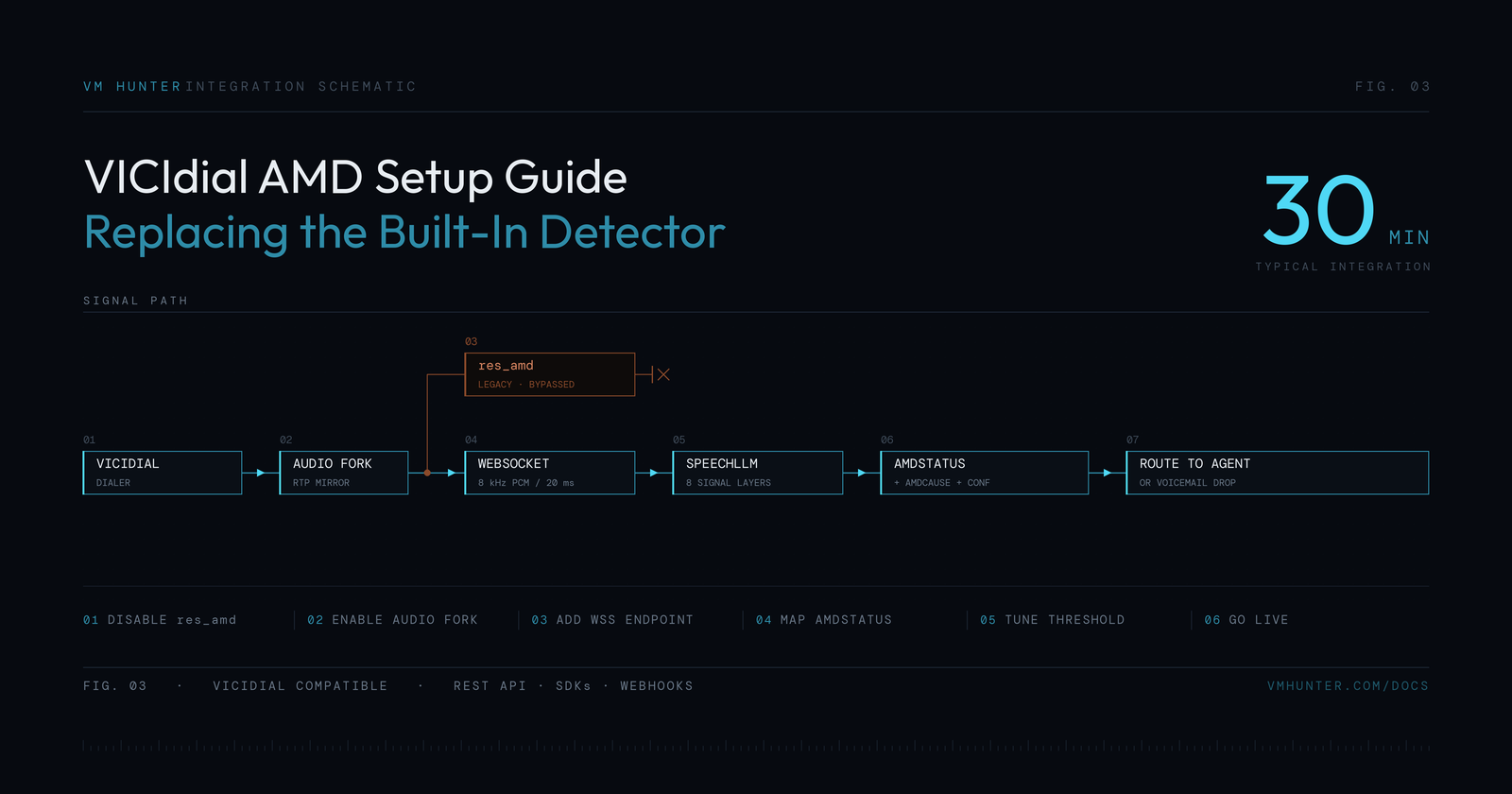
The integration has four moving parts:
1. VICIdial places the call as it always has. No change to campaigns, lists, dialer pacing, or carrier configuration.
2. Call audio is forked to an external classifier. When the channel answers, a copy of the inbound RTP stream is mirrored over a WebSocket connection as 8 kHz PCM in 20 ms frames. This is a mirror, not an interception — the original audio path is untouched, so if the classifier is unreachable the call still connects normally.
3. The AI model classifies the audio in real time. Rather than measuring silence durations, the model processes several independent classes of evidence concurrently — tone detection, energy envelope, silence texture, channel fingerprint, playback artifacts, and crucially the actual linguistic content of the greeting. Because these run in parallel rather than as a decision cascade, individual signals can be inconclusive without the classification failing.
4. The result is written back to AMDSTATUS. The classifier returns the same HUMAN and MACHINE vocabulary res_amd used, plus a CALLGUARD status for call screening and a richer cause string in AMDCAUSE. Your dialplan branches exactly as before.
The legacy res_amd module sits in this diagram as a bypassed branch. You are not uninstalling it — you are routing around it, which means rollback is a one-line dialplan change rather than a rebuild.
Prerequisites
Confirm these before you start:
- VICIdial 2.14 or later. Earlier versions work but the AGI paths differ; check
/usr/share/astguiclient/. - Asterisk 13, 16, 18, or 20. All are supported. Asterisk 11 works but lacks reliable
AudioSocketsupport, so you will need the ExternalMedia approach instead. - Outbound WebSocket egress on port 443. Most call center firewalls allow this already, but egress filtering on the telephony VLAN is common — verify explicitly rather than assuming.
- Root or sudo access to the Asterisk server for dialplan and module configuration.
- An API key from your detection provider.
- A test campaign with a small list you can dial safely. Do not do first-run validation on a live revenue campaign.
Also record your current baseline before changing anything. You cannot demonstrate improvement without a before number. At minimum, capture the current distribution of AMDSTATUS values across a few thousand calls:
SELECT amd_status, COUNT(*) AS calls
FROM vicidial_log
WHERE call_date >= NOW() - INTERVAL 7 DAY
GROUP BY amd_status
ORDER BY calls DESC;
Keep that output. You will compare against it later.
Step 1: Disable the Built-In Detector
Find where AMD is invoked in your dialplan. On a stock VICIdial install this is usually in /etc/asterisk/extensions.conf inside the outbound context, and looks something like:
exten => _91NXXNXXXXXX,1,AGI(agi://127.0.0.1:4577/call_log)
exten => _91NXXNXXXXXX,n,AMD()
exten => _91NXXNXXXXXX,n,GotoIf($["${AMDSTATUS}" = "MACHINE"]?machine,1)
exten => _91NXXNXXXXXX,n,Dial(${TRUNK}/${EXTEN:1},,tTo)
Comment out the AMD() line. Do not delete it — you want a trivial rollback path:
; exten => _91NXXNXXXXXX,n,AMD() ; legacy res_amd - bypassed, see AI AMD below
Note that VICIdial campaigns also have an AMD setting in the campaign detail screen (Answering Machine Detection → Y/N/MESSAGE). If that is set to Y, VICIdial injects AMD into the dialplan itself regardless of your manual edits. Set it to N for the campaigns you are converting, otherwise you will end up with both detectors running and racing each other to set the same variable.
Step 2: Enable the Audio Fork
There are two mechanisms depending on your Asterisk version. Both mirror audio without disturbing the primary media path.
Option A — AudioSocket (Asterisk 16+, recommended). Confirm the module is loaded:
asterisk -rx "module show like audiosocket"
If it is missing, load it and persist it in modules.conf:
asterisk -rx "module load res_audiosocket.so"
Option B — ExternalMedia via ARI (Asterisk 13+). If AudioSocket is unavailable, create an external media channel bridged to the live call. This is slightly more code but works on older builds.
In both cases the audio you forward must be 8 kHz, 16-bit signed linear PCM, mono, in 20 ms frames — 320 bytes per frame. Sending 8 kHz µ-law without converting, or sending 16 kHz frames, are the two most common integration mistakes and both produce classifications that look random rather than wrong.
Step 3: Add the WebSocket Endpoint
Add the detection call to your dialplan where AMD() used to be. Using the AGI approach:
exten => _91NXXNXXXXXX,n,EAGI(vmhunter-amd.agi)
exten => _91NXXNXXXXXX,n,NoOp(AMD=${AMDSTATUS} CAUSE=${AMDCAUSE})
exten => _91NXXNXXXXXX,n,GotoIf($["${AMDSTATUS}" = "MACHINE"]?machine,1)
The AGI script opens the WebSocket, streams forked audio, waits for the classification, and sets the channel variables. A minimal version looks like this:
#!/usr/bin/env python3
# Run with EAGI() so Asterisk passes the call audio on file descriptor 3
import os, json
from websocket import create_connection  # pip install websocket-client
from asterisk.agi import AGI

AGI_ENV = AGI()
API_KEY = os.environ["VMHUNTER_API_KEY"]
ENDPOINT = "ws://app.vmhunter.com:2701"
DEADLINE_MS = 2500
FRAME_BYTES = 320     # 20 ms of 8 kHz 16-bit mono PCM
AUDIO_FRAMES = 100    # stream the first 2 seconds

def classify(vid):
    ws = create_connection(ENDPOINT, timeout=DEADLINE_MS / 1000)
    try:
        # 1. Config first: the API key travels in this message, not a header
        ws.send(json.dumps({"config": {
            "vid": vid,
            "api_key": API_KEY,
            "sample_rate": 8000,
            "bytes_per_sample": 2,
        }}))
        # 2. Binary audio frames from the EAGI audio descriptor
        audio = os.fdopen(3, "rb", buffering=0)
        for _ in range(AUDIO_FRAMES):
            frame = audio.read(FRAME_BYTES)
            if not frame:
                break
            ws.send_binary(frame)
        # 3. End of audio, then one JSON reply
        ws.send(json.dumps({"eof": 1}))
        return json.loads(ws.recv())
    finally:
        ws.close()

def main():
    vid = AGI_ENV.env.get("agi_uniqueid")
    try:
        result = classify(vid)
        # {"AMDSTATUS": "HUMAN|MACHINE|CALLGUARD|FAILED", "AMDCAUSE": "..."}
        status = result["AMDSTATUS"]
        # Screened calls go to agents; service errors fail open
        status = {"CALLGUARD": "HUMAN", "FAILED": "NOTSURE"}.get(status, status)
        AGI_ENV.set_variable("AMDSTATUS", status)
        AGI_ENV.set_variable("AMDCAUSE", result["AMDCAUSE"])
    except Exception as exc:
        # Fail open: an unreachable classifier must never drop a live call
        AGI_ENV.set_variable("AMDSTATUS", "NOTSURE")
        AGI_ENV.set_variable("AMDCAUSE", "CLASSIFIER_UNAVAILABLE")
        AGI_ENV.verbose(f"AMD fallback: {exc}", 2)

if __name__ == "__main__":
    main()
The exception handler is the most important part of that script. Fail open, never fail closed. If the classifier times out or the network drops, the correct behavior is to treat the call as NOTSURE and route it to an agent. An agent hearing an occasional voicemail costs eight seconds; a system that hangs up on humans whenever a network path degrades costs customers.
Set the deadline deliberately. A 2500 ms ceiling is generous — classification itself typically completes well inside a few hundred milliseconds — but the ceiling protects you from a hung socket holding the channel open.
Step 4: Map AMDSTATUS
The AI classifier returns a richer result than res_amd did, and you decide how much of that richness to use.
The minimum viable mapping keeps your existing two-branch dialplan and simply substitutes the source of truth. The script above already applies it:
Classifier AMDSTATUS | Script sets AMDSTATUS | Dialplan action |
|---|---|---|
HUMAN | HUMAN | Route to agent |
MACHINE | MACHINE | Voicemail drop or hang up |
CALLGUARD | HUMAN | Route to agent (safe default) |
FAILED | NOTSURE | Route to agent (fail open) |
That alone captures most of the accuracy gain. But the classifier also reports why in AMDCAUSE, and that distinguishes cases res_amd could not represent at all. Routing those separately is where the second tranche of value lives:
- Call screening —
AMDCAUSEstarts withCALLGUARD_PHRASE, for example a "who's calling?" prompt from iOS, Android or the carrier. An automated intermediary that may still connect to a human afterward. Hanging up wastes a reachable contact. - Disconnected / intercept tones —
AMDCAUSE=DISCONNECT. SIT tones and "the number you have dialled is not in service." These should feed list hygiene immediately rather than being retried on a schedule. - Voicemail beep —
AMDCAUSE=MACHINE_BEEP. The greeting has ended, which is the right moment to start a voicemail drop. - Silence and static —
AMDCAUSE=INITIALSILENCEorMACHINE_STATIC. Dead air or a noise-only line, worth dispositioning separately so the lead can be retried.
IVR and auto-attendant greetings come back as MACHINE with AMDCAUSE=MACHINE.
Because the detail travels in AMDCAUSE, your dialplan can branch on it without breaking anything that reads AMDSTATUS:
exten => _91NXXNXXXXXX,n,GotoIf($["${AMDCAUSE}" = "DISCONNECT"]?dead,1)
exten => _91NXXNXXXXXX,n,GotoIf($["${AMDCAUSE:0:9}" = "CALLGUARD"]?screened,1)
Step 5: Choose Your Routing Policy
The classifier returns a status and a cause rather than a confidence score, so the tuning decision is which results you act on and how. That is a business decision rather than a technical one.
The asymmetry is what drives it. A false negative — a voicemail reaching an agent — costs a few seconds of agent time. A false positive — hanging up on a live person — costs a contact, a brand impression, and in regulated verticals potentially a compliance event. These are not equivalent, so your routing should not be symmetric either.
The two results worth a deliberate choice per campaign are CALLGUARD (call screening, usually a person behind it) and FAILED (the service could not classify the call, for example an invalid API key or an exhausted plan). A reasonable starting matrix by campaign type:
| Campaign type | CALLGUARD | FAILED | Rationale |
|---|---|---|---|
| Cold B2C prospecting | Drop as MACHINE | Route to agent | Contact volume is replaceable; agent time is the constraint |
| B2B outbound | Route to agent | Route to agent | Contacts are scarce and expensive to source |
| Existing customer service | Route to agent | Route to agent | Never risk hanging up on a current customer |
| Collections / regulated | Route to agent | Route to agent | Compliance exposure dominates the calculation |
| Appointment reminders | Drop as MACHINE | Voicemail drop | Voicemail is an acceptable outcome; throughput matters most |
If you use VM Hunter's ready-made VICIdial client instead of your own script, the same two choices are its AMD_CALLGUARD_STATUS and AMD_FAILED_STATUS settings.
When in doubt, route to an agent. The cost of that choice is small and the cost of the alternative is not.
Run at least a full week before adjusting. Answer-rate behavior varies substantially by day of week and hour of day, and tuning on a single afternoon's data will overfit to that afternoon.
Step 6: Go Live Safely
Do not cut over all campaigns at once. Use shadow mode first.
Shadow mode runs the classifier and logs its verdict without acting on it. Your dialplan routes every call to an agent as usual, and you accumulate a dataset of what the classifier would have done. Log it:
exten => _91NXXNXXXXXX,n,Set(CDR(userfield)=${AMDSTATUS}:${AMDCAUSE})
After a few thousand calls, sample the disagreements. Pull calls where the classifier said MACHINE and compare against the agent's actual disposition. Where the agent had a live conversation and the classifier said machine, you have found a would-be false positive. Where the agent dispositioned it as voicemail and the classifier agreed, the system is working.
This is also the only reliable way to measure your old false positive rate, because — and this is the crux of the whole problem — false positives are invisible in normal reporting. A human you hung up on and a voicemail you correctly detected produce identical rows in vicidial_log. Nothing in the standard VICIdial reporting distinguishes them. Most operations running res_amd have never measured their false positive rate because there is no report that shows it.
Once shadow mode confirms the numbers, ramp deliberately:
- One campaign, one day. Lowest-stakes list you have.
- Compare against baseline. Agent talk time per hour, contacts per agent hour, and the
AMDSTATUSdistribution you captured in the prerequisites. - Expand to 25% of campaigns for three days.
- Full cutover, keeping the commented
AMD()line in place for another few weeks.
Verifying the Integration
A checklist for confirming the setup is genuinely working rather than merely running:
Audio format is correct. If classifications look uncorrelated with reality, suspect encoding before suspecting the model. Capture a forked stream to a file and play it back — it should sound like clean narrowband speech, not chipmunks or static.
The fork is live audio, not the outbound leg. Mirroring the wrong direction means classifying your own agent's audio or ringback. Verify by capturing during a known voicemail.
Latency is inside budget. Log the delta between answer and classification. If the p99 approaches your deadline, the socket handshake is likely being re-established per call rather than pooled.
Fail-open actually fails open. Test it deliberately: block the endpoint with a firewall rule mid-campaign and confirm calls still reach agents with AMDSTATUS=NOTSURE. An untested fallback path is not a fallback path.
Both detectors are not running. Check the campaign AMD setting as well as the dialplan. Duplicate detection produces intermittent, confusing misclassifications that are painful to debug.
Common Problems
Everything classifies as NOTSURE. Almost always authentication or connectivity — the fail-open path is doing its job while the socket never opens. Check the API key and egress rules on the telephony VLAN.
Classifications arrive after the call is already routed. The AGI is not blocking on the result. Ensure the script waits for the classification rather than firing and forgetting.
Accuracy is good but agent idle time increased. This is a dialer pacing issue, not a detection issue. Better detection changes the ratio of connects that reach agents, which changes the effective load your pacing algorithm was tuned for. Re-tune the drop-rate target and pacing after cutover.
Voicemail drops are landing mid-greeting. The classifier identifies the machine faster than res_amd did, so a drop timed to the old detector's latency now fires too early. Add a short delay before the message, or use beep detection to trigger it.
What to Expect After Cutover
Realistic ranges, assuming a correctly configured integration and a baseline running stock res_amd:
- False positive rate drops from the 15–20% range to well under 1%. This is the headline change and the one your prospects experience.
- Agent talk time per hour typically improves 15–30%, driven mostly by fewer voicemails reaching agents.
- Contacts per agent hour improves in proportion to the false positives you recover — those are conversations that were previously being discarded silently.
- List quality improves over subsequent cycles as disconnect and fax classifications feed suppression rather than being retried.
The most under-appreciated outcome is the one that does not show up in a dashboard: the prospects who were being hung up on. At a 15% false positive rate, an operation running 50,000 dials a day at a 30% answer rate is dropping several hundred reachable people every single day, and no report anywhere in the system says so.
Conclusion
VICIdial's built-in AMD is not badly implemented — it is an accurate implementation of an approach whose information ceiling was reached two decades ago. Measuring speech and silence durations cannot distinguish a chatty human from a terse voicemail, because the distinguishing information is in the content and the detector cannot process content.
The replacement path is deliberately narrow: bypass res_amd, mirror audio to a model that processes content alongside acoustic signals, and write the answer back into the same AMDSTATUS variable your dialplan already reads. Nothing else about your VICIdial installation needs to change, and rollback is uncommenting one line.
The part worth not rushing is validation. Run shadow mode, sample the disagreements against agent dispositions, and choose your routing policy according to what a dropped contact actually costs your business. That measurement is valuable independent of which vendor you choose — most operations have simply never had a number for how many live humans their dialer hangs up on.
Start your free trial — 5,000 calls per month at no cost, no credit card required. Or read the integration documentation for the full WebSocket API reference and setup steps.